Many players ask why do roblox keep crashing while they are in the middle of a big game session. This guide explores every reason from hardware limits to server issues that cause the app to close unexpectedly. You will learn about internet stability and how it affects your connection to the game servers. We look at why mobile users face more crashes than pc players due to memory constraints on older devices. This article provides a clear path to fixing these issues through simple steps and technical tips. Whether you are on a phone or a computer you can find help here today. We cover everything from error codes to clearing your local cache files for a better experience. Do not let your game freeze again when you are so close to winning a match. Read on to discover the best ways to keep roblox running smoothly all day long.
Why do Roblox keep crashing on my computer?
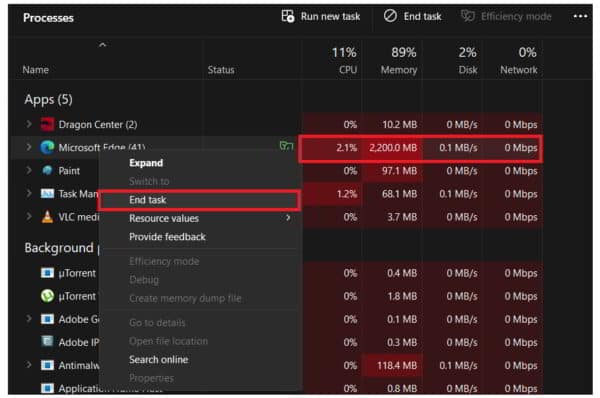
Roblox often crashes on computers due to outdated graphics drivers or insufficient system memory to handle the game's assets. You should ensure your Windows or Mac operating system is fully updated and close any background applications like Chrome or Discord. Clearing your Roblox cache files in the AppData folder is another highly effective way to stop recurring crashes and freezes.
How can I stop Roblox from crashing on my phone?
Mobile crashing is usually caused by the device running out of RAM or overheating during long play sessions. To fix this, try lowering the graphics quality in the Roblox settings menu and closing all other open apps on your phone. If the problem persists, uninstalling and reinstalling the Roblox app can clear out corrupted data that might be causing the game to close.
What is Error Code 277 in Roblox?
Error Code 277 is a common connection error indicating that your client has been disconnected from the game server. This usually happens because of a poor internet signal, router issues, or a momentary blip in your service provider's connection. Restarting your router and switching to a stable Wi-Fi or wired connection typically resolves this specific crashing issue for most players.
Does Roblox crash when the servers are down?
Yes, if the Roblox servers are experiencing technical difficulties or maintenance, your game may crash or fail to join any experiences. You can check third-party sites like Downdetector or the official Roblox Status page to see if others are reporting similar problems. If the servers are the issue, the only solution is to wait for the developers to fix the platform.
Can an antivirus stop Roblox from working?
Some aggressive antivirus programs may incorrectly flag the Roblox player as a security threat, leading to crashes or startup failures. You should add Roblox as an exception in your antivirus or firewall settings to ensure it has the permissions needed to run. This allows the game to communicate with its servers and access local files without being blocked by your security software.
Most Asked Questions about Why Do Roblox Keep Crashing
Dealing with a game that refuses to stay open is one of the most annoying parts of being a gamer. We have put together this ultimate living FAQ to help you navigate the common bugs and technical hurdles that cause Roblox to crash. This guide is updated for the latest patches and covers everything from basic fixes for beginners to advanced troubleshooting for pro players. Whether you are struggling with lag, error codes, or hardware limits, we have the honest answers and tips you need to stay in the game. Let us get your Roblox experience back to being fun and stable today!
Why does my game freeze and then close?
This is usually a sign that your hardware is being pushed to its absolute limit or is starting to overheat. When your GPU or CPU gets too hot, it might stop the application to prevent damage to your computer or phone. Try using a laptop cooling pad or reducing your graphics settings to medium to give your hardware some breathing room. It is also a good idea to check if your cooling fans are working properly and free of any dust buildup.
Is there a way to fix the white screen crash?
The white screen crash is often related to a failure in the game's rendering engine or a conflict with your graphics drivers. To fix this, you should try updating your drivers or changing the compatibility mode of the Roblox executable file to Windows 8. Sometimes, simply resizing the game window as it launches can force the graphics to render correctly and skip the white screen freeze. If all else fails, a clean reinstall of the Roblox player is the most reliable path forward.
Why do I crash only in certain Roblox games?
If you only crash in specific games like Adopt Me or Blox Fruits, the issue is likely with the game's optimization rather than your device. Some games use very complex scripts or high-resolution textures that can cause memory leaks on certain systems. You should try joining a private server or a less populated instance to see if the reduced player count improves your stability. Reporting the bug to the game's developer on social media can also help them identify and fix the problem for everyone.
How do I clear my Roblox cache on Windows?
Clearing your cache is like giving the game a fresh start and is a great way to fix many mysterious crashing issues. You can do this by pressing the Windows Key + R, typing %localappdata%, and then deleting the Roblox folder you find there. Do not worry, this will not delete your account or your progress as those are stored on the Roblox servers. Once you restart the game, it will download fresh files and hopefully run much more smoothly than it did before.
Can my internet speed cause the game to crash?
While a slow speed causes lag, an unstable connection with high packet loss is what actually causes the game to crash or disconnect. If your internet 'stutters,' the Roblox client loses sync with the server and eventually gives up, sending you back to the home screen. Try connecting your device directly to the router with an ethernet cable to eliminate Wi-Fi interference. You should also make sure no one else on your network is streaming 4K video or downloading huge files while you are trying to play.
Still have questions? Check out our other popular guides on fixing Roblox lag, understanding all error codes, and how to optimize your PC for gaming! We are here to help you have the best gaming experience possible. Feel free to leave a comment if you found a fix that we missed so we can share it with the rest of the community! Keep on gaming and stay stable!
Have you ever wondered why do roblox keep crashing just as you are about to win a big race? It feels like the universe is working against your gaming goals when the screen suddenly turns completely white or black. I remember playing a high stakes round of BedWars when my entire computer decided to take a sudden nap. It is a frustrating experience that millions of gamers face every single day across many different types of devices. This guide is your ultimate companion to solving those annoying freezes and making sure your gameplay stays very smooth. We are going to look at every possible technical reason why your game might be failing right now. From outdated drivers to messy cache files we have the fixes you need to get back in action. Let us dive into the world of troubleshooting so you can focus on having fun with your friends. You deserve a gaming experience that is reliable and free from any sudden interruptions or annoying technical errors.
Understanding the Roblox Crashing Phenomenon
The first step to fixing the problem is identifying the actual source of the persistent crashing during your gaming. Roblox is a massive platform that relies on both your local hardware and a stable connection to the internet. When one of these components fails the entire application might shut down without giving you a clear warning message. Many players find that their games close because their devices are running out of available random access memory. This is especially common on older smartphones that struggle to handle the high graphics requirements of modern roblox experiences. If your device is getting very hot it might also be shutting down the app to protect the internal hardware. We need to check if the issue is coming from your computer or if the roblox servers are down. Sometimes a simple update is all you need to restore your favorite games to a fully functional state again. Knowing who is responsible for the crash helps you save a lot of time during the troubleshooting process today.
Platform Specific Issues and Fixes
Gamers on Windows and Mac computers often face different challenges than those playing on mobile devices like iPhones or iPads. PC users should always check their graphics card drivers to ensure they are using the latest version available online. An outdated driver can cause the roblox engine to conflict with your operating system and cause a total crash. You should also look at how many background applications are running while you are trying to play a game. Apps like web browsers or discord can eat up the resources that roblox needs to run at high speeds. For mobile players the most common fix is simply clearing out the temporary data stored within the application settings. If your phone is several years old you might need to lower the graphics quality in the game menu. This reduces the strain on your processor and helps prevent the app from closing when things get very busy. Every platform has its own quirks but most issues can be solved with a few simple clicks or taps. Staying updated is the best way to avoid these technical hurdles and keep your character moving in the game.
The Ultimate Roblox Troubleshooting FAQ
Beginner / Core Concepts
1. **Q:** Why does my Roblox game just close itself without showing any error message at all? **A:** I get why this confuses so many people because it feels like the game is just giving up on you. Usually this happens when your device runs out of memory and the operating system kills the app to stay stable. You should try closing all other apps before you start playing to give Roblox all the room it needs. This happens a lot on phones with low RAM or older laptops that are trying to do too much at once. Try restarting your device completely to clear out the temporary memory and give the game a fresh start today. You have got this!
2. **Q:** Is my internet connection the reason why I keep getting kicked out of games every ten minutes? **A:** This one used to trip me up too until I realized how sensitive the Roblox servers can be to lag. If your wifi signal drops for even a second the game might decide to disconnect you to prevent data errors. You should try sitting closer to your router or using a wired ethernet cable for a much stronger connection. High ping can cause the game to freeze which looks like a crash but is actually just a network timeout. Check your speed online to make sure you have enough bandwidth for a smooth and uninterrupted gaming experience right now. It is a simple fix that works wonders!
3. **Q:** Does my graphics setting really affect whether the game will crash on my older computer or phone? **A:** I definitely understand the struggle of wanting the game to look beautiful while keeping a very high frame rate. However setting your graphics to automatic or the lowest level can prevent your hardware from overheating and crashing the app. When the game tries to render too many particles or shadows it can overwhelm your processor and cause a freeze. You can find the graphics slider in the escape menu and moving it to the left will help tremendously. Start with the lowest setting and slowly move it up until you find the perfect balance for your device. Give it a try and see the difference!
4. **Q:** Why do I need to keep my Roblox app updated to the latest version to stop the crashing? **A:** It might seem like a chore to download updates all the time but they are actually full of stability fixes. Developers are constantly working to patch bugs that cause the game to close unexpectedly on different types of hardware. If you are using an old version the game might not know how to talk to the servers correctly. Most devices update automatically but it never hurts to check the app store or the website for a manual download. Keeping things fresh ensures you have the latest security and performance improvements for a better time playing games. You are doing great!
Intermediate / Practical & Production
5. **Q:** What should I do if Roblox keeps crashing specifically when I join a very large and detailed game? **A:** This is a classic case of a game being too heavy for the current hardware or having unoptimized scripts. Some popular games have thousands of parts and complex physics that require a lot of power to process all at once. I suggest trying a smaller or less intensive game to see if the crashing continues to happen there as well. If it only happens in one specific game the problem might actually be with the game creator and not you. You can try clearing your cache to ensure no old files are conflicting with the new assets being loaded. It is all about finding what your device can handle comfortably while still having fun with friends.
6. **Q:** How do I update my graphics drivers to make sure Roblox runs without any technical glitches or freezes? **A:** Dealing with drivers can feel a bit like homework but it is the best way to boost your gaming performance. You need to visit the website of your graphics card maker like NVIDIA or AMD to find the latest software. They usually have an automatic tool that detects your card and installs the correct update for you in minutes. Once you install the new driver you should restart your computer to make sure all the changes take effect. This often fixes the white screen or black screen issues that many PC players complain about during their sessions. You will be back in the game before you even know it!
7. **Q:** Why does clearing the Roblox cache help fix persistent crashing issues on both PC and mobile platforms? **A:** I like to think of the cache as a messy closet where the game stores old files it might need later. Over time those files can get corrupted or mixed up which causes the game to get confused and stop working. By clearing the cache you are essentially cleaning out the closet so the game can start with a fresh set. On PC you delete files in the AppData folder while on mobile you can offload the app in settings. This is a very common fix that solves about ninety percent of the weird technical problems players face. It is like giving your game a much needed deep clean!
8. **Q:** Can an antivirus program actually stop Roblox from working correctly and cause it to crash on startup? **A:** It sounds strange that a program designed to protect you would cause problems but it happens more often than you think. Some antivirus software is very strict and might see Roblox as a threat which prevents the game from opening properly. You can try adding Roblox to the allowed list or white list in your antivirus settings to fix this issue. This tells the software that the game is safe to run and should not be blocked or interrupted while playing. If you are worried just turn the antivirus off for a minute to see if the game finally launches. You are totally in control here!
9. **Q:** What are Roblox error codes like 277 or 267 and how do they help me fix my crashing? **A:** Think of error codes as a secret language the game uses to tell you exactly what went wrong during play. Error 277 almost always points to a connection problem where the server lost track of your character for too long. Error 267 usually means you were kicked by a script or an admin for something happening within that specific game world. Knowing these numbers helps you search for the exact solution instead of guessing what might be wrong with your setup. It is like being a detective for your own computer so you can get back to the action faster. Keep those codes handy!
10. **Q:** Why does my Roblox crash every time I try to use a recording software or stream my gameplay? **A:** Streaming and recording take up a massive amount of processing power that competes with the game for your device resources. If your computer is not very powerful it might struggle to run both programs at the same time which leads to crashes. You should try lowering the resolution of your recording or using a hardware encoder to take the load off. Sometimes just updating your streaming software can fix the compatibility issues that cause the game engine to fail during play. It is a balancing act but you can find the right settings with a bit of patience and testing. You have got this!
Advanced / Research & Frontier
11. **Q:** Is it possible that a memory leak in a specific game script is causing my client to crash? **A:** This is a more technical issue that usually happens when a game creator makes a mistake in their coding logic. A memory leak occurs when a script keeps asking for more memory but never gives it back to the system. Eventually your device runs out of room entirely and the Roblox client has no choice but to shut down immediately. You can check the developer console by pressing F9 to see if there are any red error messages appearing. If you see the memory usage climbing higher and higher without stopping you have found a leak in the game. Informing the developer is the best way to get this fixed for everyone in the community.
12. **Q:** How does hardware thermal throttling contribute to Roblox crashing during long and intense gaming sessions on laptops? **A:** Laptops are notorious for getting very hot because all their powerful components are packed into such a tiny and cramped space. When the temperature gets too high the processor slows itself down to cool off which can cause the game to freeze. If the temperature continues to rise the system might shut down the application entirely to prevent permanent damage to the hardware. You should try using a cooling pad or playing in a cooler room to keep your device at a safe temperature. Keeping the air vents clean of dust is also a great way to ensure your laptop stays cool and fast. Your hardware will thank you!
13. **Q:** Can corrupted Windows system files be the hidden reason why my Roblox client keeps failing to launch properly? **A:** Sometimes the problem is not with the game at all but with the foundation it is built upon in Windows. If certain system files are missing or damaged the Roblox player might not be able to load its necessary components. You can use the System File Checker tool by typing sfc scannow into your command prompt to find and fix errors. This deep scan looks for any broken parts of your operating system and replaces them with healthy versions from the cloud. It is a powerful way to fix mysterious crashes that do not seem to have any other obvious or clear cause. You are becoming a real tech pro!
14. **Q:** Does using a Virtual Private Network or VPN cause Roblox to crash more frequently due to packet loss? **A:** Using a VPN can add an extra layer of complexity to your connection which might lead to instability during fast gameplay. The data has to travel through the VPN server before reaching Roblox which can increase your ping and cause data packets to drop. If the connection is not stable enough the game client might lose its sync with the server and close down. You should try turning off your VPN to see if the crashing stops while you are playing your favorite games online. Many players find that a direct connection is much more reliable for gaming than using an encrypted tunnel or proxy. Give it a shot today!
15. **Q:** How do I perform a clean reinstall of Roblox to ensure every single old and broken file is gone? **A:** A standard uninstall often leaves behind small files that can keep causing the same problems even after you reinstall the app. To do a clean reinstall you should uninstall the game and then manually delete the Roblox folders in your local data. This ensures that the new installation is starting from a completely blank slate with no old baggage to worry about. Once you download the latest version from the official site you will have the most stable version of the game possible. It takes a little extra effort but it is the most effective way to solve persistent and annoying crashing issues. You are all set to play!
Quick Human-Friendly Cheat-Sheet for This Topic
- Always restart your device first because it clears out the tired memory and fixes many simple software glitches.
- Keep your graphics drivers updated to make sure your computer knows exactly how to talk to the game engine.
- Lower your in-game graphics settings if you notice your device is getting too hot or starting to lag heavily.
- Check the official Roblox status page to see if the servers are having a bad day before blaming your device.
- Clear your temporary internet files and Roblox cache once a month to keep the application running lean and very fast.
- Sit closer to your router or use a cable to make sure your internet connection stays solid while you play.
- Make sure no other big programs are running in the background and eating up your precious processing power and RAM.
Outdated graphics drivers are a primary cause for PC users while limited RAM affects mobile gamers significantly today. Network instability often triggers Error Code 277 which forces the game client to close its connection to servers. Clearing the local app data cache is a universal fix that resolves most corrupted file issues across all platforms. Overheating hardware can lead to thermal throttling which causes the Roblox application to freeze or crash during intense gameplay. Regularly updating the Roblox client ensures you have the latest stability patches and compatibility fixes for your specific operating system.
35


Why Does Roblox Keep CRASHING Quick Fixes For Desktop YouTube . Why Does My Roblox Keep Crashing TechCult Why Does My Roblox Keep Crashing . Roblox Keeps Crashing How To Fix On PC Mobile Why Does Roblox Keep Crashing . FIX ROBLOX KEEPS CRASHING MOBILE ON IOS WHY DOES ROBLOX KEEP CRASHING Hqdefault . Roblox Keeps Crashing Why Does My Roblox Keep Crashing Mobile TikTok Roblox Keeps Crashing Fixed

Roblox Keeps Crashing Why Does My Roblox Keep Crashing Mobile TikTok . Roblox Keeps Crashing Why Does My Roblox Keep Crashing Mobile TikTok . How To Fix Roblox Crashing On PC YouTube . Is Roblox Crashing Right Now What You Need To Know Roblox Keeps Crashing . Fix Common Roblox Issues On Windows 10 How To Fix Roblox Not Launching



C Mo Arreglar Roblox Keeps Crashing En PC 2026 Nuevo . Why Does Roblox Keep Crashing Mini Militians Hub Why Does Roblox Keep Crashing . Why Does Roblox Keep Crashing YouTube . Roblox Keeps Crashing Why Does My Roblox Keep Crashing Mobile TikTok . Why Does Roblox Keep Crashing Stop Roblox Crashing 100 Work YouTube

Why Does Roblox Keep Crashing Mobile Android IPhone IPad TCG Roblox Keeps Crashing On Mobile 1536x864 . Why Does Roblox Keep Crashing Find The Way To Fix. Roblox Keeps Crashing Why Does My Roblox Keep Crashing Mobile TikTok . Why Does Roblox Keep Crashing How To Fix Roblox Crash Why Does Roblox Keep Crashing Thumbnail . Why Does Roblox Keep Crashing On My PC Possible Reasons Workarounds E4d21 1920


Why Does Roblox Keep Crashing YouTube . Why Does Roblox Keep Crashing Common Causes And Quick Fixes Why Does Roblox Keep Crashing . How To FIX Roblox Keeps Crashing Stop Roblox Crashing UPDATED YouTube . Why Does Roblox Keep Crashing YouTube . Top 8 Ways To Fix Roblox Keeps Crashing Issues 2026 Roblox Keeps Crashing Try These Steps 768x475


Roblox Keeps Crashing Issue Why How To Fix 6 Solutions Unexpected Error Roblox Keeps Crashing . How To Resolve Roblox Crashing Issues Easily 10 Roblox Crashing 2 . Why Does Microsoft Roblox Keep Crashing Causes And Fixes Articles E3a71741 975d 40c6 B03b . Why Does Roblox Keep Crashing Guide Why Does Roblox Keep Crashing Step 33 . Why Does Roblox Keep Crashing Guide Crop 127 140 127px An Unexpected Error Has Occurred Roblox Step 7

Roblox Keeps Crashing Why Does My Roblox Keep Crashing Mobile TikTok . Roblox Keeps Crashing Why Does My Roblox Keep Crashing Mobile TikTok . Stop Roblox Crashing Your Easy Guide Roblox Keep Crashing . Is Roblox Crashing Right Now What You Need To Know Roblox Crashing On PS4PS5 . Top 8 Ways To Fix Roblox Keeps Crashing Issues 2026 Ts 3 600x398