Ever wondered what makes your gaming rig tick? Understanding the inside of a gaming PC is crucial for every US gamer, from the casual player unwinding after work to the competitive enthusiast. With 87% of US gamers playing regularly, often averaging over 10 hours a week, optimizing your setup means more fun, better performance, and smarter spending. This guide demystifies the CPU, GPU, RAM, storage, and other essential components that power your virtual worlds. Discover how to identify bottlenecks, plan budget-friendly upgrades, and ensure your system is ready for the latest titles like the trending social deduction games or next-gen open-world adventures. We cut through the hype to give you practical insights for balancing your passion for gaming with life's other demands, ensuring you get the most value for your time and money. Learn how knowing your hardware can save you headaches and boost your in-game experience, whether you're building a new PC or upgrading an existing one.
What are the essential components inside a gaming PC?
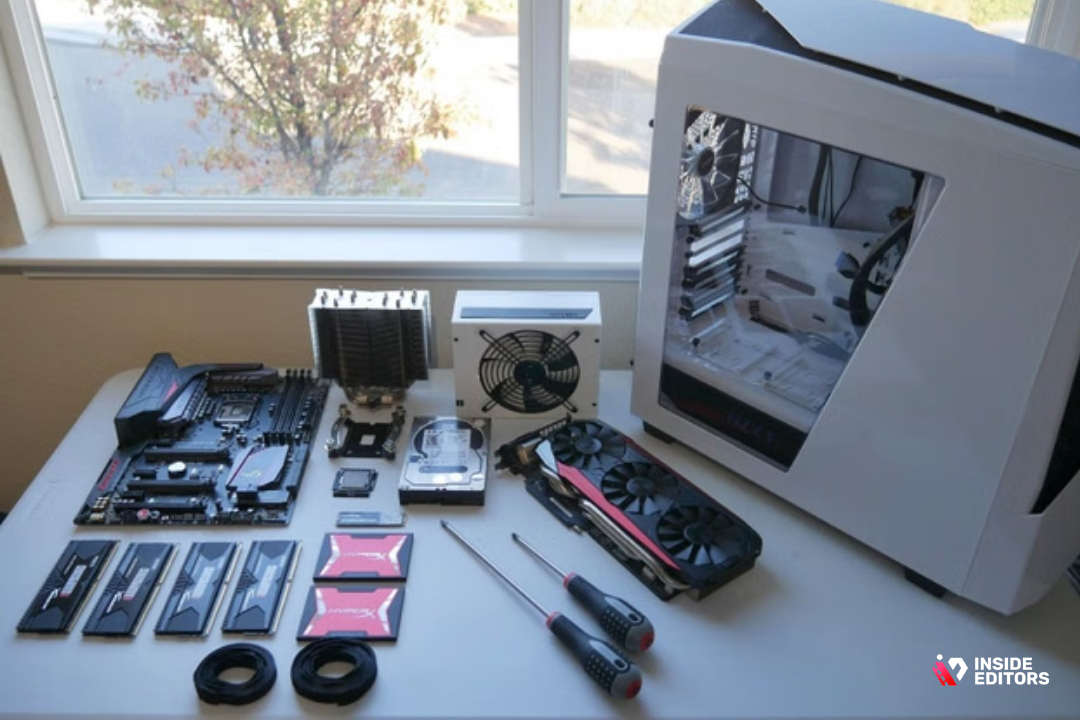
The essential components inside a gaming PC are the CPU (Central Processing Unit), GPU (Graphics Processing Unit), RAM (Random Access Memory), Storage (typically an SSD), Motherboard, Power Supply Unit (PSU), and a Cooling solution for the CPU and overall system. These parts work together to render games and run your operating system.
How do I know if my gaming PC needs an upgrade?
You'll know your gaming PC needs an upgrade if you experience consistently low frame rates in current games, long load times, frequent stuttering, or if you can't run new titles at your desired settings. Checking game performance benchmarks against your current hardware and monitoring component usage (CPU/GPU) while gaming can also highlight bottlenecks.
What's the difference between a gaming PC and a regular PC?
The primary difference is the focus on performance components. A gaming PC features a much more powerful GPU, a faster CPU, and typically more RAM and faster storage (SSDs) than a standard office or home PC. These upgrades are necessary to handle the demanding graphical and computational requirements of modern video games.
Can I build a gaming PC on a budget?
Absolutely! Building a gaming PC on a budget is very achievable. Focus on getting the best value-for-money GPU and CPU, often looking at mid-range options or previous generation hardware on sale. Prioritize an SSD for your operating system and main games, and start with 16GB of RAM. You can often save money on the case or aesthetic features.
What should I look for in a gaming PC's cooling system?
For a gaming PC, look for adequate CPU cooling (either a robust air cooler or an All-in-One liquid cooler) and good case airflow. This means multiple case fans (typically 2-3 intake, 1-2 exhaust) strategically placed to move air efficiently. Effective cooling prevents thermal throttling, ensuring consistent performance and component longevity.
How important is the power supply unit (PSU) in a gaming PC?
The PSU is critically important. It supplies stable power to all your components. An underpowered or low-quality PSU can lead to system instability, crashes, and potentially damage your hardware. Always choose a PSU with sufficient wattage for your components plus some headroom, and a good efficiency rating (e.g., 80 Plus Bronze or Gold).
Will more RAM make my games run faster?
More RAM will make your games run faster if you currently have insufficient RAM (e.g., 8GB or less for modern titles). Upgrading from 8GB to 16GB typically provides a noticeable performance boost and smoother multitasking. However, going beyond 16GB (e.g., to 32GB) usually offers diminishing returns for gaming alone, though it can benefit memory-intensive applications or future-proofing.
Hey fellow gamers! Ever felt that frustrating lag or wondered why your favorite new game, maybe one of those trending cozy management sims or a highly anticipated AAA action RPG, isn't running as smoothly as you'd like? You're not alone. Many of us, balancing demanding jobs, family life, and everything in between, just want to unwind and have a great time when we finally boot up our PCs. We value every minute of gameplay, whether it's building skills, socializing with friends on Discord, or simply escaping into another world. But sometimes, our gaming PC throws a wrench in the fun.
Understanding what's truly inside of a gaming PC isn't just for tech gurus anymore; it's empowering knowledge for any adult gamer looking to optimize their experience without breaking the bank or dedicating endless hours to research. With over 87% of US gamers regularly engaging with their hobby, often for 10+ hours a week, a clear grasp of your hardware means smarter upgrade decisions, better performance, and ultimately, more enjoyable gaming sessions. Forget the marketing hype; we're here for the practical truth. Let's pull back the case and explore the heart of your machine, answering the real questions you're typing into search engines right now.
What are the Absolute Core Components Inside of a Gaming PC?
At its heart, a gaming PC is a collection of specialized parts working in harmony. The most crucial components inside of a gaming PC are the Central Processing Unit (CPU), Graphics Processing Unit (GPU), Random Access Memory (RAM), and Storage (SSD/HDD). These four dictate almost everything about your gaming experience, from frame rates to load times. Think of them as the brain, the artist, the short-term memory, and the long-term memory of your digital playground. Each plays a distinct role in rendering those stunning visuals and processing complex game mechanics, crucial for titles whether you're dominating in esports or exploring vast open worlds.
Why is My CPU So Important for Gaming Performance?
The CPU, or Central Processing Unit, is often called the 'brain' of your PC. For gamers, it handles all the non-graphical computations: game physics, AI behaviors, processing player inputs, and running background applications like Discord or your streaming software. While the GPU gets a lot of glory for visuals, a weak CPU can bottleneck even a powerful graphics card, leading to lower frame rates, especially in CPU-intensive games or scenarios with many on-screen entities. Modern gaming, particularly in multiplayer titles or grand strategy games, relies heavily on strong multi-core CPU performance to keep everything running smoothly.
How Does My Graphics Card (GPU) Create Such Realistic Worlds?
The Graphics Processing Unit (GPU) is arguably the single most important component inside of a gaming PC for visual fidelity and high frame rates. It's specifically designed to rapidly process and render millions of polygons, textures, and effects that make up the game world. When you see stunning ray-traced reflections or incredibly detailed character models, that's your GPU doing the heavy lifting. Investing in a good GPU ensures you can play games at higher resolutions, with better graphical settings, and at smoother frame rates, which is essential for immersive experiences and competitive play. It’s also often the most expensive component, making smart choices here vital for budget-conscious gamers.
How Much RAM Do I Really Need for Modern Games?
RAM, or Random Access Memory, is your PC's short-term memory. It stores data that your CPU and GPU need to access quickly. For modern gaming, 16GB of RAM is generally considered the sweet spot for a smooth experience. You can get by with 8GB for older or less demanding titles, but for current AAA games, especially those that run in parallel with browser tabs, voice chat, and other background apps, 16GB provides ample headroom. Going to 32GB can offer a slight edge for very memory-intensive tasks or future-proofing, but for most adult gamers balancing life, 16GB provides the best value and performance balance right now.
SSD vs. HDD: Which Storage is Best for Gaming?
When it comes to storage inside of a gaming PC, Solid State Drives (SSDs) have largely replaced traditional Hard Disk Drives (HDDs) as the preferred option for games. SSDs, particularly NVMe drives, offer dramatically faster load times for games and the operating system. This means less waiting for levels to load and quicker transitions within games, which significantly improves the quality of life for any gamer with limited play time. While HDDs still offer cheaper storage per gigabyte for large media files, installing your favorite games on an SSD is a non-negotiable upgrade for modern gaming performance. Many gamers use a smaller SSD for the OS and primary games, with a larger HDD for less-played titles or general storage.
Does My Motherboard Actually Affect Gaming Performance?
The motherboard is the central nervous system of your PC, connecting all the components. While it doesn't directly boost frame rates like a GPU, a good motherboard ensures stable communication between your CPU, RAM, GPU, and storage. It provides the necessary power delivery, expansion slots (for more RAM, SSDs, or future upgrades), and ports. A well-chosen motherboard offers room for future upgrades, stable overclocking (if you're into that), and reliable performance. A cheap, low-end motherboard can limit your upgrade path or even lead to instability, so it's wise to invest in one that matches your current and anticipated hardware.
Why is PC Cooling So Important Inside of a Gaming PC?
Gaming pushes your PC's components hard, generating significant heat. Effective cooling — whether from air coolers, liquid coolers (AIOs), or case fans — is vital to prevent thermal throttling. When components get too hot, they automatically slow down to prevent damage, leading to a noticeable drop in performance and stuttering. Good cooling maintains optimal operating temperatures, ensuring your CPU and GPU can consistently deliver their maximum performance, extending the lifespan of your components, and keeping your gaming sessions smooth and stable, especially during long play sessions of demanding titles.
What Role Does the Power Supply Unit (PSU) Play in My Rig?
The Power Supply Unit (PSU) might seem unexciting, but it's the unsung hero inside of a gaming PC. It converts wall power into the correct voltages for all your components. An underpowered or unreliable PSU can lead to system instability, crashes, and in severe cases, even damage your hardware. Always choose a PSU with sufficient wattage for your components (including a little headroom for future upgrades) and a good efficiency rating (like 80 PLUS Bronze or Gold). A reliable PSU ensures consistent power delivery, which is essential for stable, high-performance gaming. Never skimp on the PSU!
Can My PC Case Impact Performance?
While the PC case doesn't directly influence raw processing power, it plays a crucial role in airflow and component longevity. A well-designed case provides ample space for components, good cable management options, and excellent airflow paths to keep everything cool. A cramped case with poor airflow can lead to higher temperatures and thermal throttling, effectively reducing your performance. Look for cases with good fan mounting options, dust filters, and sufficient space for your chosen CPU cooler and GPU length. Plus, a good-looking case can be a nice bonus for your gaming setup!
How Can I Balance Gaming Performance with My Budget and Time?
For adult gamers juggling life's demands, striking a balance between performance, budget, and limited time is key. Focus on smart upgrades: often, a GPU upgrade offers the biggest performance boost. After that, an SSD for games and sufficient RAM are excellent value-for-money improvements. Instead of always chasing the absolute bleeding edge, consider components that offer great performance-per-dollar. Look for sales on previous generation hardware, which often provide incredible value. Remember, the goal is consistent, enjoyable gameplay, not just benchmark scores. Prioritize smooth frames at your preferred resolution, and invest in components that directly impact your favorite games and playstyle. This month, many gamers are finding great deals on mid-range GPUs that perfectly handle popular social and cozy games without breaking the bank.
Conclusion: Empowering Your Gaming Journey
Understanding what's inside of a gaming PC empowers you to make informed decisions, troubleshoot issues more effectively, and get the most enjoyment out of your valuable gaming time. You don't need to be an expert builder, but knowing the roles of your CPU, GPU, RAM, and storage helps you optimize your setup for the games you love and your personal lifestyle. With smart choices, you can achieve a fantastic gaming experience that balances performance with budget and responsibilities. What's your biggest gaming challenge when it comes to your PC's hardware? Comment below!
FAQ Section
What is a CPU bottleneck?
A CPU bottleneck occurs when your CPU isn't fast enough to keep up with your graphics card, causing the GPU to wait for the CPU, which limits overall frame rates and can lead to stuttering. It means your GPU isn't being fully utilized.
Is 8GB of RAM enough for gaming in 2026?
While 8GB of RAM can run many games, 16GB is the recommended minimum for a smooth and consistent gaming experience in 2026, especially for modern AAA titles and multitasking while gaming.
How often should I upgrade my gaming PC?
Typically, gamers upgrade their GPU every 2-4 years and their CPU every 4-6 years. RAM and storage upgrades are often done as needed for capacity or speed. It depends on your budget, performance needs, and how demanding new games are.
Are pre-built gaming PCs worth it?
Pre-built gaming PCs can offer convenience and often come with warranties, making them a good option for busy gamers. However, building your own can often provide better value and more customization if you're comfortable with the process.
What is thermal throttling?
Thermal throttling is when your CPU or GPU automatically reduces its performance to prevent overheating and potential damage. It's a protective measure that leads to a noticeable drop in frame rates and overall system responsiveness during intense gaming.
Understanding core gaming PC components, optimizing performance and value, budget-friendly hardware upgrades, troubleshooting common gaming PC issues, essential parts like CPU GPU RAM storage PSU, future-proofing your gaming rig, balancing gaming with real-life responsibilities.
35



Best Gaming PC Builds For 2026 Best Gaming PC Builds For 2026.webp. The Ultimate Gaming PC Build 2026 Guide By Xidax 1 Unnamed . Building My First Gaming PC With Intel YouTube . 7 Best Gaming PCs Of 2026 Power Performance And Value Revealed Top Gaming Pcs 2026 1lmv2 . The 15 Best Gaming PC In 2026 Tested Reviewed Com Best Budget CPU Air Coolers For Silent Operations PC Builds
.jpg)

How To Build Gaming PC Guide 2026 Step By Step Budget Gaming PC 2026 Gaming Pc . Why PC Gaming Defines The Future Over Consoles In 2026 NoobFeed Pc Build (1) . Complete PC And Gaming Setup In 2026 Alanah Pc . Build PC 2026 Per GTA VI Potenza Massima E Bolletta Minima Generated Images 6. Building An Affordable Gaming PC For 2026 GeekaWhat FI DP056 Antec Flux M 9060XT 1024x576



Gaming PC Build For 2026 Best PC Parts And High Performance Tips For Gaming Pc Tower . Come Scegliere Le Componenti Per Assemblare Un PC Gaming Nel 2026 Scegliere Componenti Per Assemblare Pc Gaming 2026.webp. The Best Gaming PC Builds For 2026 Top Picks And Reviews Best Pc Build . Best PC Cases 2026 Our Tested Picks For Your Next Build Tom S Hardware . How To Build A Gaming PC In 2026 Complete Parts Guide And Assembly Gaming Pc Build 2026 Hero



Best PC Builds For Gaming 2026 Ultimate Guide To Building Your Dream Best PC Builds For Gaming 2026 1024x683 . Future Proof Gaming Video Editing PC Build Inside Editors 6.Future Proofing Your Gaming Video Editing PC For 2026 2028 . An OLED Monitor Might Be The Best Upgrade You Can Make To Your PC . This Futuristic Gaming PC Build Is Out Of This World Ugahari Gaming Pc Internals . The ULTIMATE AMD Gaming PC Build 2026 YouTube


How To Build A Future Proof Gaming PC In 2026 Complete Custom Build Guide 1773043345 . Building A Gaming PC In 2026 Is DIFFERENT YouTube . PC Gaming Demands 2026 Is Your Rig Ready For Next Gen Games A Sleek Futuristic Gaming Pc Setup With Vibrant Rgb Lighting Showcasing High Performance Component . Best Gaming PC 2026 High Performance Buil Gaming PC Guru Best Gaming Pc On Amazon Featured 800x500 . The Best Gaming PC Of 2026 Top Prebuilt Desktops Gaming Pc



Gaming Desktop PC Guide 2026 Build The Ultimate Gaming Setup 2 2 3 . Gaming Desktop PC Guide 2026 Build The Ultimate Gaming Setup 3D5 0007 00J68 02 . Sarajevo Bosnia And Herzegovina February 6 2026 AMD Ryzen 9950X3D Sarajevo Bosnia And Herzegovina February 6 2026 Amd Ryzen 9950x3d Desktop Processor Displayed Inside Gaming Computer With Rgb Cooling Photo . The 5 Best Gaming PC Cases 2026 Which One Should You Buy YouTube . The Best Gaming PC In 2026 TechRadar 1200 80



Whats Inside A Gaming Pc Unveiling The Core Components My Blog Whats Inside A Gaming Pc . The Gaming PC You Need To Build For 2026. Wow Worthy Builds Only The 12 Top PC Cases We Saw At CES 2026 PCMag 2 . Future Proof Gaming Video Editing PC Build Inside Editors 3.Balancing Performance And Budget In 2026 . Wow Worthy Builds Only The 12 Top PC Cases We Saw At CES 2026 PCMag 43.fit Lim.size