Understanding if HDMI truly impacts your gaming experience can be a game-changer for serious players and casual enthusiasts alike. This comprehensive guide dives deep into the technical specifications, versions, and practical implications of HDMI cables and ports on your gaming performance. We explore how different HDMI standards affect resolution, refresh rates, and response times, crucial factors for immersive and competitive gameplay. Discover the truth behind expensive cables, learn how to troubleshoot common display issues, and make informed decisions to optimize your setup without breaking the bank. Whether you are battling foes in a fast-paced FPS or exploring vast open worlds, knowing your HDMI can unlock your system's full potential, ensuring crisp visuals and smooth action for every session. Avoid common pitfalls and enhance your fun with reliable information. This article aims to empower you to make informed decisions regarding your gaming setup, ensuring you get the best visual experience possible for your investment. We will demystify the jargon and provide actionable advice.
Related gamesWhat is the best HDMI cable for PS5 or Xbox Series X?
For the PS5 and Xbox Series X, the best HDMI cable is an Ultra High-Speed HDMI cable, which is certified for HDMI 2.1. This cable type supports the full 48 Gbps bandwidth required for features like 4K resolution at 120Hz, Variable Refresh Rate (VRR), and Auto Low Latency Mode (ALLM) that these consoles offer. Without an HDMI 2.1 cable, you will not be able to unlock the consoles full visual and performance capabilities on a compatible display.
How do I know if my HDMI cable is HDMI 2.1?
You can usually tell if your HDMI cable is 2.1 by looking for 'Ultra High-Speed HDMI Cable' or '48Gbps HDMI Cable' printed on the cable jacket or its packaging. Many certified cables also feature specific HDMI Forum logos indicating their compliance. If you purchased it recently and it explicitly states 4K120Hz support, it is likely 2.1. Older cables or those without specific branding are usually not 2.1 and will not support its full feature set.
Will using an HDMI 2.1 cable on an HDMI 2.0 port improve performance?
No, using an HDMI 2.1 cable on an HDMI 2.0 port will not magically improve your performance beyond what the HDMI 2.0 port is capable of. The cable is only one part of the chain; the performance is limited by the oldest HDMI version in the connection path (source, cable, display). An HDMI 2.1 cable is backward compatible and will work, but it will only transmit data at the HDMI 2.0 ports maximum bandwidth, meaning you wont get 4K 120Hz or VRR.
Can a bad HDMI cable cause flickering or no signal during gaming?
Yes, a bad or low-quality HDMI cable, especially when trying to push high resolutions and refresh rates, can absolutely cause flickering, sparkling, or even a complete loss of signal. This is because digital signals are sensitive to integrity issues. If the cable cannot reliably transmit all the data, the display will struggle to interpret it, leading to visual errors or the 'no signal' message. Upgrading to a certified cable often resolves these frustrating problems.
What are the main benefits of HDMI 2.1 for competitive gamers?
For competitive gamers, the main benefits of HDMI 2.1 are primarily 4K 120Hz support, Variable Refresh Rate (VRR), and Auto Low Latency Mode (ALLM). 4K 120Hz provides smoother motion and better clarity for tracking fast-moving targets. VRR eliminates screen tearing and stuttering, leading to a more consistent visual experience. ALLM automatically puts your display into its lowest latency mode, reducing input lag and ensuring your actions register faster, giving you a crucial edge.
Does HDMI ARC or eARC affect gaming performance?
HDMI ARC (Audio Return Channel) or eARC (enhanced Audio Return Channel) primarily handle audio transmission from your TV back to a soundbar or receiver. They do not directly affect video gaming performance like resolution or refresh rate. However, eARC offers higher bandwidth for uncompressed, high-bitrate audio formats like Dolby Atmos and DTS:X, enhancing immersion and sound quality. This improved audio can contribute to a more enjoyable gaming experience, but it wont change your frame rates or input lag.
Should I prioritize HDMI 2.1 on my TV or my gaming monitor?
Prioritize HDMI 2.1 on the display you use most for high-performance gaming. If you primarily game on a large living room TV with a console, ensure your TV has HDMI 2.1 ports for 4K 120Hz and VRR. If you are a PC gamer using a dedicated monitor, many high-end gaming monitors support similar features via DisplayPort, but if you prefer HDMI, ensure it is 2.1. The key is to match the HDMI version between your source and display for the best experience.
Ever felt that slight stutter in a crucial moment, or wondered why your brand new 4K display isnt quite as stunning as you hoped while battling foes or exploring vast worlds? You are not alone. Many gamers, especially those balancing jobs, families, and life commitments, find themselves pondering the subtle nuances of their setup. We invest in powerful consoles and PCs, sleek monitors, and comfortable peripherals, but often overlook a seemingly simple component: the HDMI cable. But **does HDMI matter for gaming**? Absolutely, and understanding why can unlock your systems full potential, making your precious gaming hours more enjoyable and immersive.
With 87% of US gamers regularly dedicating an average of 10+ hours a week to their passion, optimizing every part of your setup, even down to the cables, is key to relaxation and top performance. Gamers today, whether diving into social co-op games with friends, honing skills in esports titles, or unwinding with a cozy narrative, value seamless experiences and value for money. This guide is for you: the gamer who wants to understand the tech without the hype, solve common setup issues, and ensure every frame counts. We will cut through the jargon and provide clear, actionable advice to help you get the best visual and responsive experience from your gaming rig or console.
What we are covering today will empower you to make smart choices, troubleshoot problems, and elevate your gameplay without needing a degree in electrical engineering. We are here to ensure your gaming sessions are smooth, crisp, and exactly what you expect from your hard-earned investments.
Does HDMI Version Really Impact My Gaming Experience?
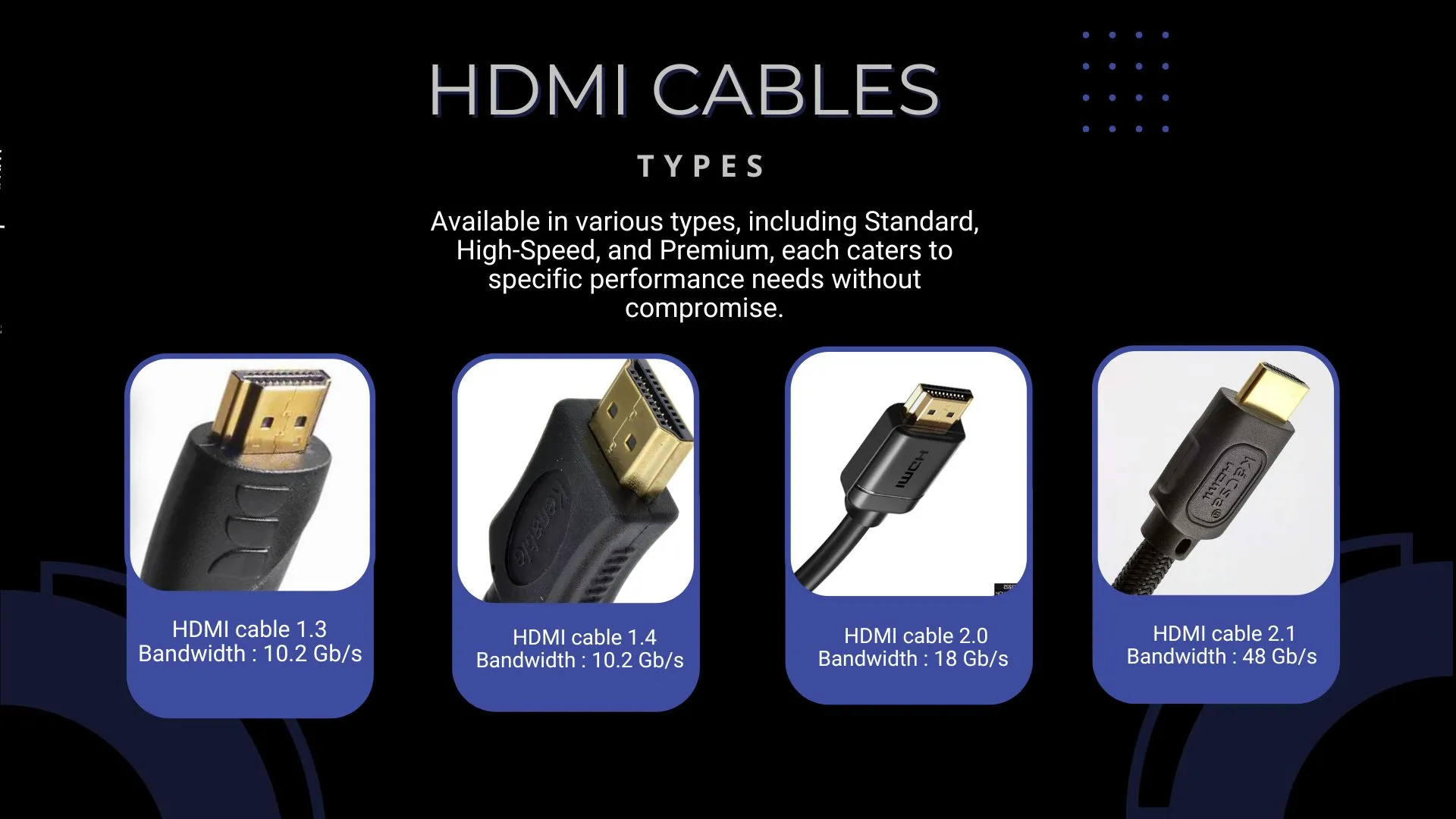
Yes, absolutely. The HDMI version is crucial because it dictates the maximum bandwidth available for video and audio data transmission. Older versions like HDMI 1.4 support up to 4K resolution at 30Hz, which is fine for movies but definitely not ideal for modern gaming. When we talk about gaming, especially on current-gen consoles like the PS5 or Xbox Series X, or a high-end gaming PC, you are aiming for higher resolutions and refresh rates like 4K at 60Hz or even 120Hz. For these demanding visuals, you need at least HDMI 2.0 or, even better, HDMI 2.1.
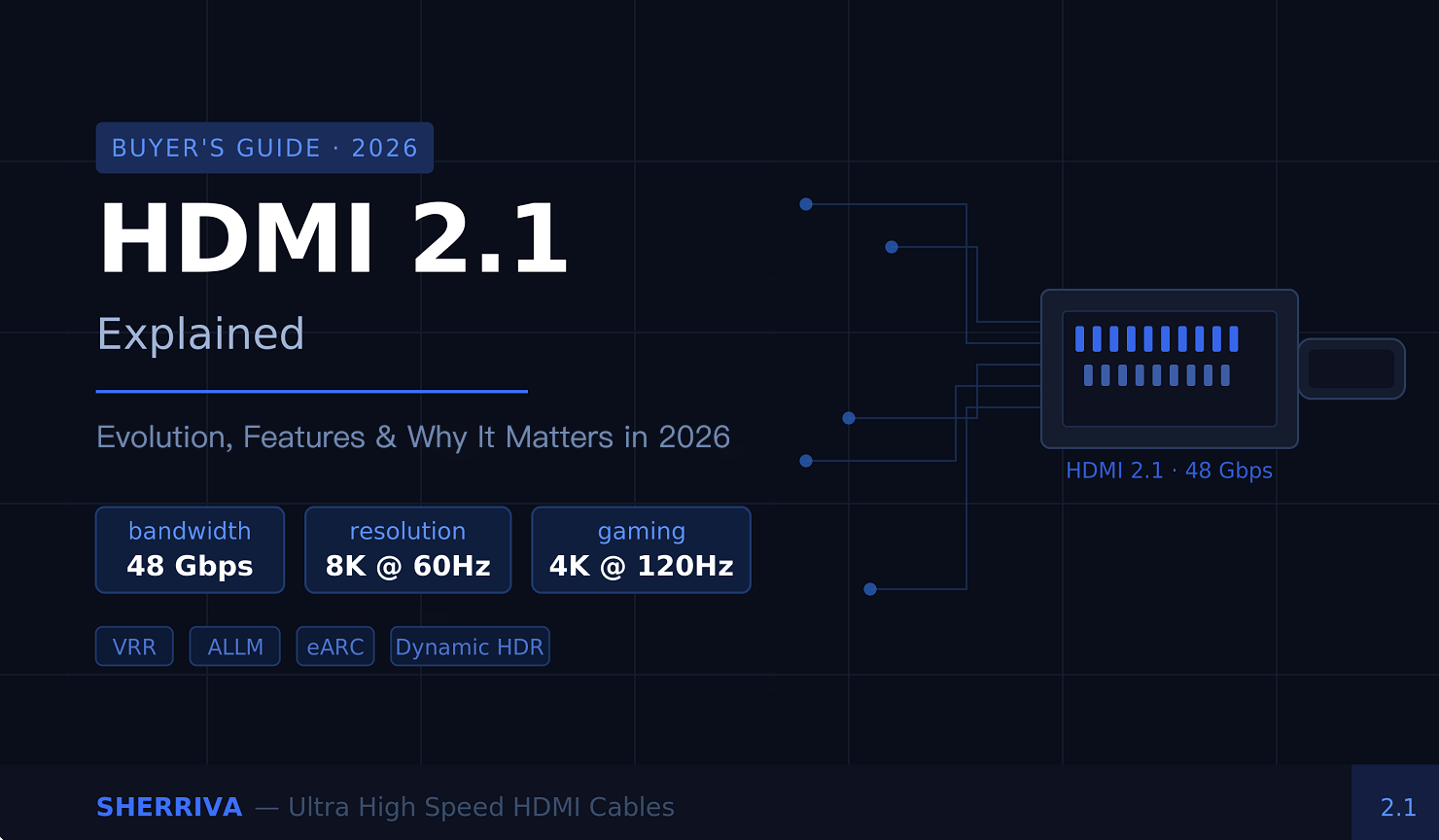
HDMI 2.1 is the game-changer for current and future gaming. It offers significantly increased bandwidth up to 48 Gbps, enabling resolutions up to 10K and, more relevantly for gamers, 4K at 120Hz or even 8K at 60Hz. It also introduces features like Variable Refresh Rate (VRR) and Auto Low Latency Mode (ALLM). VRR eliminates screen tearing and stuttering for smoother gameplay, while ALLM automatically switches your display to its lowest latency mode when it detects a game being played. Without the correct HDMI version, your expensive monitor or TV and powerful console/PC cannot deliver their full graphical potential, leaving you with a less fluid or lower resolution experience than you paid for.
What are the Key Differences Between HDMI 2.0 and HDMI 2.1 for Gamers?
The core difference boils down to bandwidth and advanced features, both of which profoundly impact gaming. HDMI 2.0 supports up to 18 Gbps, allowing for 4K resolution at 60Hz, 1080p at 240Hz, and features like HDR (High Dynamic Range) which significantly improve color and contrast. This has been the standard for several years and still provides a good experience for many.
HDMI 2.1, however, ramps up the bandwidth to a massive 48 Gbps. This increased capacity unlocks several key gaming advantages:
- 4K resolution at 120Hz: Essential for next-gen console and PC gamers seeking buttery-smooth motion.
- 8K resolution at 60Hz: While less common for gaming today, it ensures future compatibility.
- Variable Refresh Rate (VRR): This synchronizes the display's refresh rate with the GPU's output, eliminating screen tearing and stutter for incredibly fluid gameplay.
- Auto Low Latency Mode (ALLM): Automatically switches your TV or monitor to its lowest latency mode when it detects a game being played, reducing input lag without manual adjustment.
- Enhanced Audio Return Channel (eARC): Provides higher bandwidth audio, crucial for uncompressed, high-bitrate audio formats like Dolby Atmos and DTS:X, enhancing immersion.
For gamers, especially those playing competitive titles or enjoying graphically intense single-player adventures, HDMI 2.1 offers a noticeable upgrade in visual fidelity and responsiveness. With 60% of US gamers balancing their passion with jobs and family, getting the most out of your hardware during those limited gaming hours is paramount.
Do Expensive HDMI Cables Make a Difference for Gaming?
This is a common question and a source of much debate. In most practical scenarios, especially for typical cable lengths (under 10-15 feet), an expensive HDMI cable provides little to no discernible benefit over a reasonably priced, certified cable. Digital signals either arrive intact or they dont; there is no 'better' picture quality with a more expensive cable. What you need is a cable that meets the specification for your required bandwidth.
For HDMI 2.0, a 'High-Speed HDMI' cable is sufficient. For HDMI 2.1, you need an 'Ultra High-Speed HDMI' cable, which is certified to handle the 48 Gbps bandwidth. These cables are designed with better shielding to prevent interference and thicker wires for signal integrity, but a $100 cable often performs identically to a $20 certified cable of the same type. The biggest factor for cable quality becomes more relevant with longer runs (over 15-20 feet), where signal degradation can become an issue. In those cases, active optical HDMI cables might be necessary. Always look for official certification labels to ensure you are getting a cable that meets the stated specifications, rather than just relying on price or brand name.
How Can I Check My HDMI Cable's Version and Capabilities?
Unfortunately, most HDMI cables dont have their version number printed directly on them in an easily readable format like 'HDMI 2.1'. This can be frustrating! However, you can often infer the capability based on its marketing and certifications, or by checking the packaging if you still have it. Here is what to look for:
- For HDMI 2.0: Look for 'High-Speed HDMI Cable' or 'Premium High-Speed HDMI Cable' on the packaging.
- For HDMI 2.1: Look for 'Ultra High-Speed HDMI Cable' or '48Gbps HDMI Cable'. These often have specific logos from the HDMI Forum.
- If you have an older cable without specific branding, assume it is an older version (like 1.4 or 1.3) and consider upgrading if you are experiencing issues with high resolutions/refresh rates.
The best way to verify is to check the specifications of your display (TV/monitor) and your source device (console/PC). If your TV supports 4K 120Hz and has HDMI 2.1 ports, and your PS5 or PC also outputs that signal, then you absolutely need an Ultra High-Speed HDMI cable to enable those features. If you are not getting the desired resolution or refresh rate, the cable is often the first suspect after checking your device settings.
What About Input Lag and Response Time Does HDMI Affect These?
Yes, HDMI can indirectly affect input lag and response time, primarily through the features it supports and the quality of the signal. While the cable itself does not add significant lag in short runs, the HDMI *version* and its associated features are critical. For example, HDMI 2.1 introduces Auto Low Latency Mode (ALLM). When enabled, ALLM automatically tells your display to switch to its lowest latency 'Game Mode', which can significantly reduce processing delays. Without ALLM, you might have to manually switch modes, potentially leading to more input lag if you forget.
Furthermore, the ability of HDMI 2.1 to support higher refresh rates (like 120Hz) directly impacts perceived responsiveness. A 120Hz display refreshes twice as often as a 60Hz display, meaning there is less time between frames, and your input actions appear on screen faster. While the display's native response time is a hardware feature of the panel itself, ensuring your HDMI setup can deliver the maximum supported refresh rate is vital for minimizing overall system latency. For competitive gamers who value every millisecond, ensuring your HDMI chain (source, cable, display) is optimized for lowest latency and highest refresh rates is non-negotiable.
HDMI vs DisplayPort Which is Better for PC Gaming?
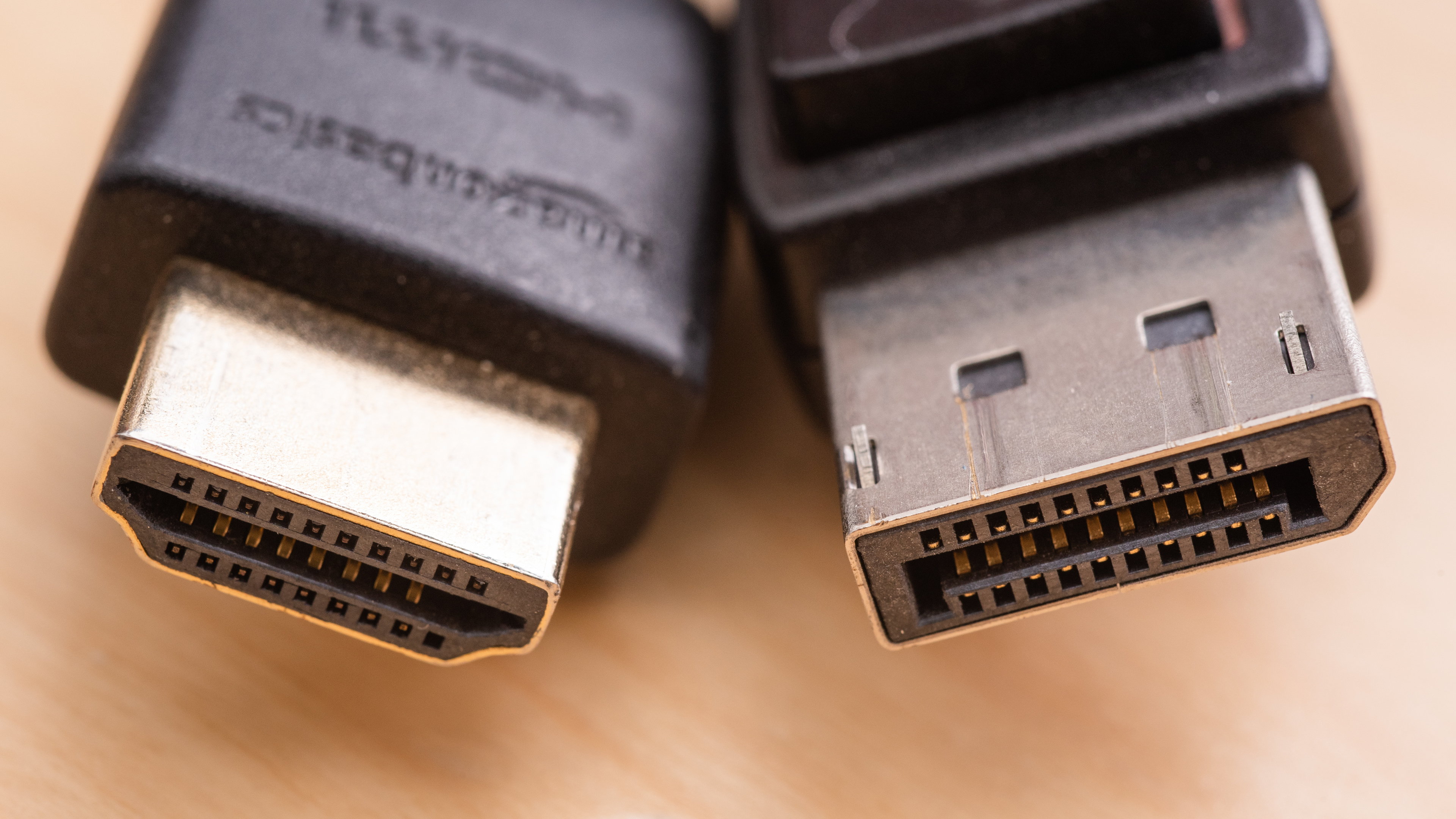
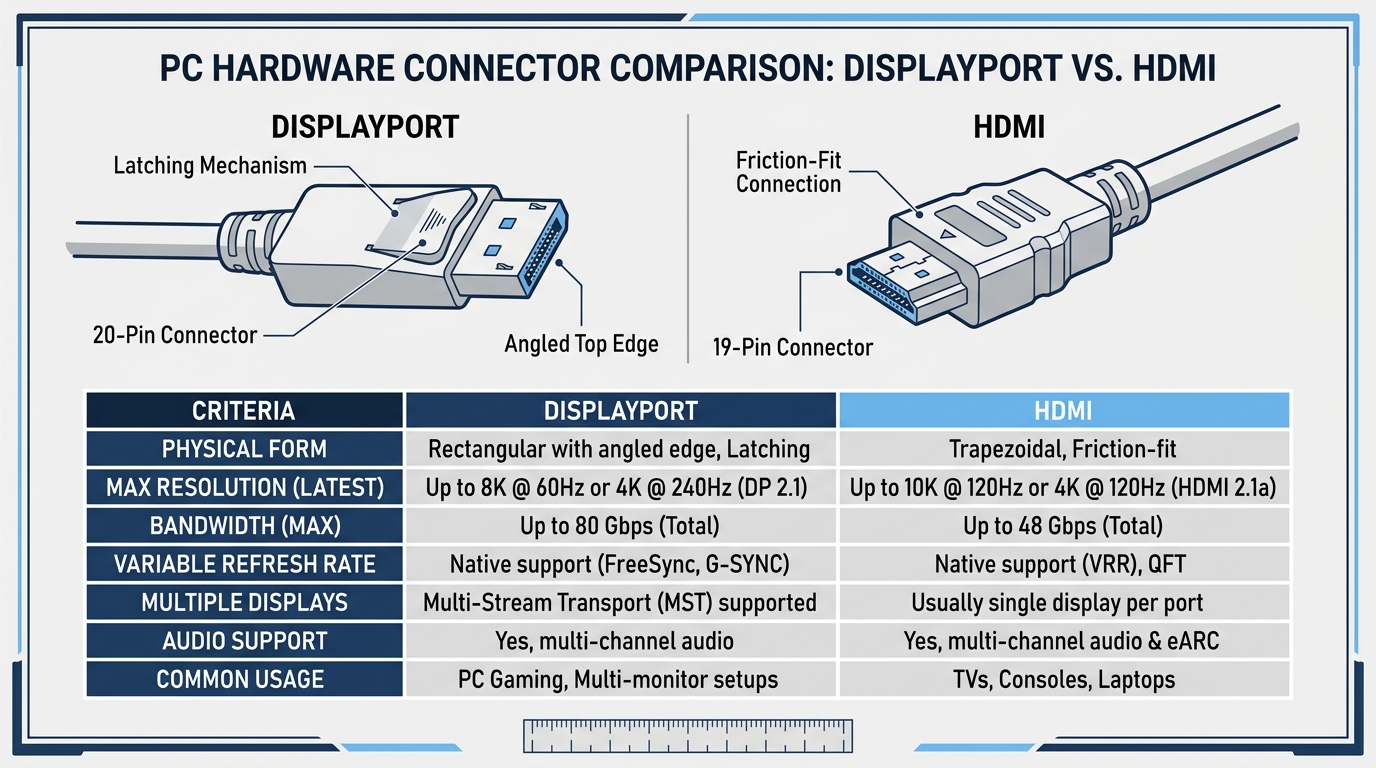
For PC gamers, the choice often comes down to HDMI versus DisplayPort. While both are excellent digital display interfaces, DisplayPort generally holds an edge for dedicated PC gaming monitors, especially those with very high refresh rates and resolutions. Modern DisplayPort versions (like 1.4 and 2.0) offer comparable or even higher bandwidth than HDMI 2.1, supporting features like G-Sync and FreeSync more broadly and often with higher maximum specifications.
Here is a quick comparison:
- Bandwidth: DisplayPort 1.4 supports up to 8K at 60Hz or 4K at 120Hz (with Display Stream Compression), similar to HDMI 2.1. DisplayPort 2.0 boasts even higher bandwidth, allowing for 4K at 240Hz or 8K at 120Hz.
- Adaptive Sync: DisplayPort has been the primary interface for NVIDIA G-Sync and AMD FreeSync (though HDMI 2.1 now supports FreeSync Premium Pro).
- Multi-Monitor: DisplayPort supports Multi-Stream Transport (MST), allowing you to daisy-chain multiple monitors from a single port, a handy feature for productivity and immersive setups.
- Prevalence: Most dedicated gaming monitors feature DisplayPort inputs, while TVs often prioritize HDMI.
For console gamers, HDMI is the standard. For PC gamers, if your monitor has DisplayPort, it is often the preferred choice, particularly for very high refresh rate setups or if you are leveraging advanced adaptive sync technologies. However, with HDMI 2.1, the gap has significantly narrowed, and both can offer superb experiences depending on your specific hardware and needs.
Can an Old HDMI Cable Cause Visual Artifacts or Blurry Images?
Yes, an older or low-quality HDMI cable can definitely cause visual artifacts, flickering, or even a completely black screen, especially when trying to push high resolutions and refresh rates. Unlike analog signals that gracefully degrade with static or blur, digital signals from HDMI are more 'all or nothing'. If the signal integrity is compromised due to poor shielding, thin wires, or excessive length, you might experience:
- Sparkling or Snow: Random white or colored dots appearing on the screen.
- Flickering: The screen briefly going black or flashing on and off.
- Color Distortion: Incorrect colors or a noticeable tint.
- No Signal: The display simply states 'No Signal' even though everything is connected.
- Inability to Achieve Desired Resolution/Refresh Rate: Your system might default to a lower setting if it detects an unreliable signal.
These issues are more prevalent when trying to run 4K at 60Hz or 120Hz over an HDMI 1.4 cable, or using a very long, uncertified cable. Always ensure your cable is certified for the bandwidth your devices require. For busy adult gamers, troubleshooting these issues can eat into valuable gaming time, so a reliable cable from the start is a wise investment.
How Do I Optimize My HDMI Setup for the Best Gaming Performance?
Optimizing your HDMI setup is about ensuring all components in your signal chain are compatible and capable. Here is a step-by-step guide:
- Identify Your Display's Capabilities: Check your TV or monitor's manual or specifications online. What is its maximum resolution, refresh rate, and what HDMI version ports does it have (e.g., HDMI 2.0, HDMI 2.1)? Note which specific ports are HDMI 2.1 if applicable.
- Identify Your Source's Capabilities: For consoles (PS5, Xbox Series X), they output HDMI 2.1. For PC, check your graphics card's output ports.
- Choose the Right Cable: Match the cable to the highest common denominator. If both your source and display are HDMI 2.1 capable for 4K 120Hz, then purchase an 'Ultra High-Speed HDMI' cable. If your setup is older and only supports 4K 60Hz, a 'High-Speed HDMI' cable is fine.
- Enable Game Mode on Your Display: Most modern TVs and monitors have a 'Game Mode' that reduces input lag by bypassing certain image processing. Manually enable this or ensure ALLM is active if your setup supports HDMI 2.1.
- Check Your Device Settings: On your console or PC, ensure the display settings are configured to output the correct resolution and refresh rate your display supports. Sometimes these dont automatically default to the highest setting.
- Keep Cables Short and Tidy: For typical home setups, keep HDMI cables as short as practically possible to minimize potential signal degradation. Avoid coiling them tightly or running them next to power cables that could cause interference.
- Update Firmware: Occasionally, TV or monitor firmware updates can improve HDMI compatibility or enable new features. Check your display manufacturers website periodically.
By following these steps, you can ensure your HDMI connection is not a bottleneck, letting you enjoy your games with maximum visual fidelity and responsiveness. With current trends leaning towards social gaming and performance optimization, a solid setup lets you focus on the fun and skill-building.
FAQ Section
What is the minimum HDMI version for 4K gaming?
For 4K gaming, you need at least HDMI 2.0 for 4K at 60Hz. If you want 4K at 120Hz with features like VRR, HDMI 2.1 is essential.
Can HDMI cables reduce frame rates?
An HDMI cable itself does not directly reduce frame rates. However, if your cable or port cannot handle the bandwidth required for your desired resolution and refresh rate, your system might automatically downgrade to a lower resolution or refresh rate, which effectively means fewer frames are being displayed per second.
Is there an HDMI cable specifically for gaming?
While there isnt a single 'gaming' HDMI cable, 'Ultra High-Speed HDMI' cables are the recommended type for modern gaming. They are certified to support the high bandwidth and features (like 4K 120Hz, VRR) that current-gen consoles and gaming PCs utilize.
How important is HDMI for VR gaming?
For PC VR headsets, DisplayPort is more commonly used. However, for consoles that might support VR experiences, the HDMI version and bandwidth are crucial to ensure a stable, high-resolution, and low-latency signal to the display, which is vital for preventing motion sickness and ensuring immersion.
Does HDMI cable length affect performance?
Yes, HDMI cable length can affect performance. Over longer distances (typically beyond 15-20 feet), signal degradation can occur, potentially leading to visual artifacts, flickering, or a complete loss of signal, especially with higher bandwidth requirements. For long runs, active optical HDMI cables are often recommended.
Can I use an HDMI adapter without losing quality?
Using a simple adapter (e.g., HDMI to DVI) can sometimes lead to a loss of features like audio or certain resolutions/refresh rates, as it often involves converting signals. However, high-quality, passive adapters for the same signal type (e.g., HDMI to DisplayPort adapter, not converter) generally do not introduce noticeable quality loss for standard uses.
Conclusion
So, **does HDMI matter for gaming**? Absolutely. It is not just a cable; it is a critical conduit for the high-fidelity visuals and responsive gameplay that modern systems are designed to deliver. From ensuring you get that smooth 4K 120Hz experience with HDMI 2.1 to understanding that an expensive cable isnt always better, the right HDMI setup can significantly enhance your gaming sessions. By taking a few moments to understand your hardware and choose the appropriate cables, you can avoid common frustrations and make the most of your valuable gaming time. Remember, your goal is to relax, have fun, and perhaps build some skills or connect with friends online, and your equipment should help, not hinder, that experience.
What is your biggest gaming challenge when setting up new gear? Comment below! We love hearing about how fellow gamers balance their passion with life and find ways to optimize their play.
HDMI versions (2.0, 2.1) are crucial for high resolution and refresh rates like 4K 120Hz. Cable quality matters for signal integrity, especially over longer distances and with higher bandwidth demands. Higher refresh rates reduce input lag and improve fluidity. Always match your HDMI cable and port version to your display and console PC capabilities. Understanding ARC eARC can simplify audio setups. Proper troubleshooting can fix common display issues. Investing wisely in the right HDMI gear can significantly enhance your gaming experience.
35

HDMI LA Showcases Gaming Tech At CES 2026 Twitter FB Post 177 . HDMI 2 1 Cables Essential For 2026 Home Theater Gaming Foyun Cables HDMI 2.1 Cables 2026 Must Have For Gaming Home Theater 3 . 8 Best HDMI 2 1 Cables For Gaming March 2026 Guide Best HDMI 2.1 Cables For Gaming 1024x683 . HDMI 2 1 Explained Evolution Features And Why It Matters In 2026 HDMI2.1 FINAL . Does HDMI Support 144Hz Refresh Rate Aumoz Trusted Audio Components Does HDMI Support 144Hz Refresh Rate 1024x558

Gaming HDMI Cables Choose High Refresh Low Latency Foyun Cables ????? HDMI ???? 1 . Best HDMI Cable 2026 HDMI 25 1024x536 . Roblox Bridge Battles Codes March 2026 1 New Codes Available Best HDMI 2.1 Cables For Gaming . HDMI 2 1 Cables Essential For 2026 Home Theater Gaming Fyelec HDMI 2.1 Cables 2026 Must Have For Gaming Home Theater 2 . 8 Best Replacement HDMI Ports For Game Consoles June 2026 Complete Guide Best Replacement HDMI Ports


HDMI 2 0 Vs 2 1 Cables The S Guide Hdmi 2.0 Vs 2.1 Cable.webp. Displayport Vs Hdmi Which Is Better For Gaming HUQC Misc Hdmi Dp Large . 8 Best HDMI Cable Options For Every Setup In 2026 Eneba Hub Best Hdmi Cable. 8 Best HDMI Cable Options For Every Setup In 2026 Eneba Hub Best Hdmi Cable . HDMI 2 1 Vs HDMI 2 0 What S The Real Difference In 2026 Fyelec HDMI


10 Best RCA To HDMI Converters For Gaming March 2026 Complete Guide Best RCA To HDMI Converters For Gaming 768x512 . HDMI 2 1 Vs DisplayPort Vs AOC What Canadian Buyers Choose In 2026 Unnamed 19 1200x647 . 8 Best VGA To HDMI Adapters For Retro Gaming March 2026 Guide Featured 1024x572 . HDMI LA To Demo Ultra96 HDMI 2 2 Cable Prototypes And 500 Hz Gaming HDMI 2.2 HERO 400x208 . DisplayPort Vs HDMI Gaming Refresh Rate VRR SunbeamTech Displayport Hdmi Connector Comparison


Best HDMI Cable For Soundbar 2026 Top Picks For Superior Audio SL500 . What Does An HDMI Port Look Like And Which To Use Pacroban Hdmi Port 5cf232e3 1d17 47ec Bb0f . Does HDMI Cable Quality Matter Everything You Need To Know Does Hdmi Cable Quality Matter Everything You Need To Know 1. 3 Practical Ways To Add More HDMI Ports To Your TV GHacks Tech News GHacks Articles 70 . HDMI LA Bringing Gaming Tech Demos To CES 2026 Including New Ultra96 Gemini Generated Image


Best HDMI Cables For Gaming 2024 Guide VCELINK 1500x1000 1 2 . What Is HDMI Image.axd. Gaming HDMI Cables Choose High Refresh Low Latency Foyun Cables ????? HDMI ???? . The Best Gaming TVs 2026 AVForums Anchor 1 1 . HDMI LA HDMI 2 2 Ultra96 500Hz 14933 1765932052


10 Best HDMI Splitters July 2026 Top Picks Best HDMI Splitters . Best HDMI Cable For PS5 In 2026 Top Picks For 4K120Hz And HDR Gaming Hdmi2.1 Cable . 8 Best HDMI Switches For 4K June 2026 Expert Reviews Best HDMI Switches For 4K . HDMI 2 2 Standard To Show Its At CES 2026 Post 141719 En . HDMI Cables And Types HDMI CABLES 1 .webp